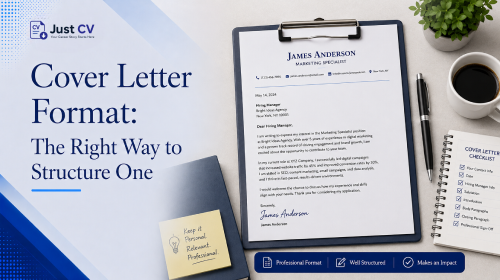
A cover letter follows four parts: a header with your contact details, an opening hook that connects you to the role, a body that builds on your resume instead of repeating it, and a closing call to action. Getting this structure right is what makes the letter easy to read and easy to say yes to.
Key takeaways
- A cover letter has four parts: header, opening hook, body, closing CTA.
- Each part does a different job none of them should repeat your resume word for word.
- Format shifts slightly depending on whether you’re pasting into an email body or attaching a document.
- Most guides cover formatting rules or writing guidance. This one covers both, plus the channel question most guides skip.
Most cover letter format guides fall into one of two camps. Some focus on visual rules margins, fonts, spacing without explaining why those sections exist. Others walk through what to write in each section but leave the formatting mechanics thin. Almost none address a question every applicant eventually hits: should this be an attached file, or text pasted into the email body? This guide covers all three.
Format matters more than it might seem. According to a Resume Genius survey of 625 U.S. hiring managers conducted between 2023 and 2025, most hiring managers say they read cover letters even when a posting doesn’t require one. Separate recruiter-behavior research compiled by Resume.io shows a meaningful share of recruiters spend as little as thirty seconds on a first read. A clear, scannable structure is what makes that short window work in your favor.
The 4-Part Structure
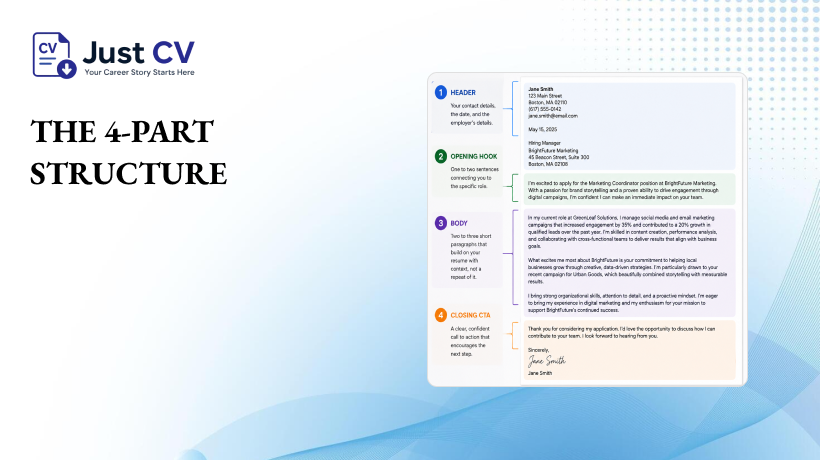
Every strong cover letter, regardless of industry or experience level, follows the same four-part skeleton.
Alt text: cover letter format structure diagram
- Header – your name, contact details, and (if applying by document) the date and employer’s details.
- Opening hook -one to two sentences connecting you to this specific role, not a generic greeting.
- Body – two to three short paragraphs that build on your resume with context, not a repeat of it.
- End with a simple, confident call to action that encourages readers to take the next step, followed by your author sign-off.
That’s the whole shape. Everything below explains why each piece earns its place and what tends to go wrong when it doesn’t.
Why Each Part Matters
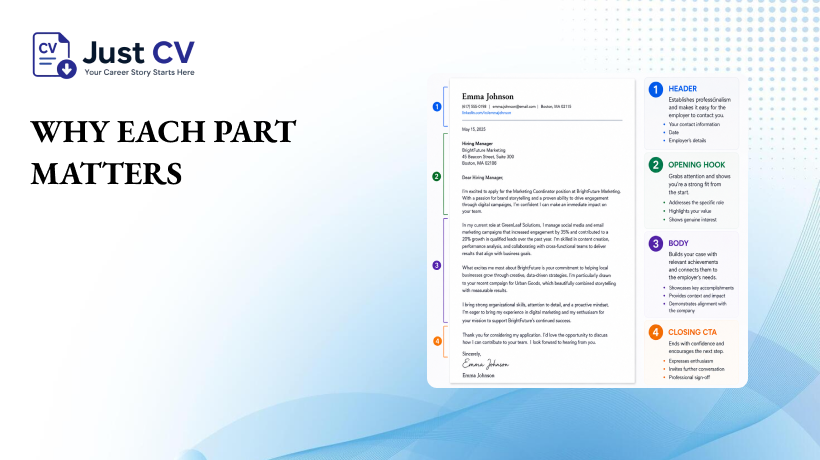
The header sets the tone before anyone reads a word
The header is the first thing a hiring manager sees, and a clean one signals attention to detail before your writing even starts. Keep it simple: name, phone, email, and a portfolio or LinkedIn link if relevant. Skip decorative borders or icons that can confuse an ATS parser trying to read your contact details.
The opening hook earns the next sentence
This is where most cover letters lose momentum. Openings like “I am writing to apply for the position of…” tell the reader nothing they don’t already know from the subject line. A stronger opening names something specific to the role, the team, or a detail about the company and connects it to your experience in one clear sentence.
Avoid: generic openings that could be pasted into any application for any company.
Instead: name the specific role and one concrete reason you’re a fit for it.
The body should add context, not repeat your resume
This is the section competitors tend to under-explain. Your resume already lists what you did. The cover letter’s job is to explain why it matters for this role- the reasoning your resume doesn’t have room for. Repeating bullet points from your resume in paragraph form wastes the one asset a cover letter actually has: room to tell a story.
This is also where non-linear experience gets a fair hearing. A career break, a freelance stretch, or a shift between industries doesn’t need to be explained away – it needs the right framing, and a body paragraph that connects it to the role you want. If your path here wasn’t a straight line, that counts. What matters is showing how it prepared you for what’s next.
The closing CTA should be confident, not passive
End with a clear, specific next step – not a vague “I hope to hear from you.” A confident close signals you’re ready for the conversation, without pressure or over-selling.
Avoid: “I hope you’ll consider my application.” (passive, easy to skim past)
Instead: I’d be happy to discuss how my experience can add value to your team.
Format by Channel (Email vs. Attachment)
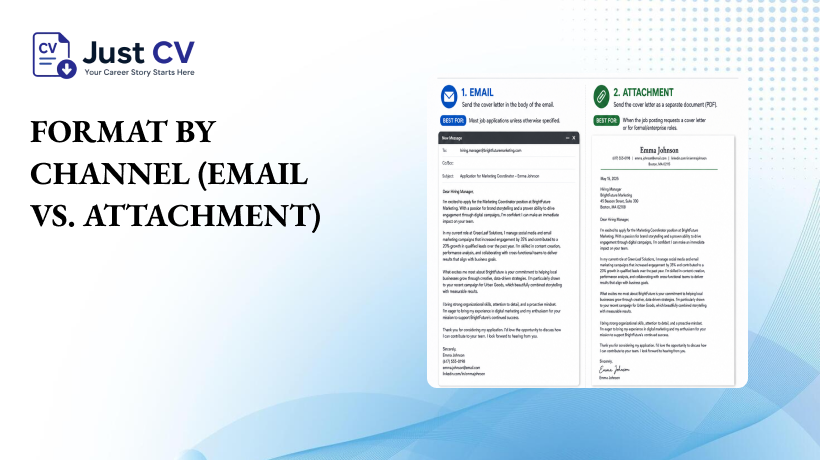
Here’s the part most cover letter guides skip entirely: the format should shift slightly depending on how you’re sending it. A cover letter written for a formal letterhead won’t have the same impact when pasted into an email. Treating both formats the same is a common mistake.
| Element | Attached Document | Email Body |
| Header | Full header: name, contact info, date, employer address | Skip the formal header – your email signature already covers this |
| Greeting | Formal salutation on its own line | Same greeting, but can sit closer to the first line of text |
| Length | 250–400 words, formatted with clear paragraph breaks | Slightly shorter; scannable on a phone screen in one scroll |
| Formatting | Can use a subtle letterhead style, consistent font throughout | Plain text only – no embedded styling email clients may strip |
| Closing | Formal sign-off, full name, then a separate signature block | Sign-off flows directly into your email signature |
| File type (if attached) | PDF preferred – preserves formatting across devices and most ATS platforms | N/A |
Quick rule of thumb: if the job posting says “attach a cover letter,” build the formal document version. If it says “tell us why you’re interested” in the application form, use the leaner email-body version same structure, tighter formatting.
Bringing It Together
The four-part structure isn’t a template to fill in mechanically – it’s a shape that gives your experience room to make its case. A clean header builds trust. A specific opening earns attention. A body that adds context, instead of repeating your resume, does the actual persuading. And a confident close invites the next step without pressure.
If you’d rather start from a structure that’s already built correctly for both formats, JustCV’s cover letter templates follow this exact four-part shape – ATS-tested, and ready to adapt whether you’re attaching a document or pasting into an email box.
Explore Templates
FAQs
What is the correct format for a cover letter?
A cover letter should follow four parts: a header with your contact details, an opening hook connecting you to the role, a body that adds context beyond your resume, and a closing call to action. Length is typically 250–400 words, one page.
Should a cover letter be an attachment or in the email body?
It depends on the application instructions. If asked to attach a document, use a formal header and PDF format. If asked to paste text into an email or form field, use a leaner version without the formal header, since your email signature already covers contact details.
How long should a cover letter be?
Most cover letters run 250–400 words roughly three to four short paragraphs. Long enough to add real context, short enough to read in under a minute.
Do I need a cover letter for every application?
Many postings request one; some don’t. When it’s optional, a well-structured cover letter can still add context a resume can’t especially for a career change, a gap, or a role that isn’t a straightforward next step.
What should the opening line of a cover letter say?
Name the specific role and one concrete reason you’re a fit, rather than a generic “I am writing to apply.” A specific opening signals you’ve read the posting and connects your experience to it directly.
Should a cover letter repeat what’s on my resume?
No, the body should build on your resume with context and reasoning, not restate the same bullet points in paragraph form. Repetition wastes the one thing a cover letter offers that a resume doesn’t: room to explain the “why.”
What file format should I use for a cover letter attachment?
PDF is generally the safest choice it preserves formatting across devices and is broadly compatible with ATS platforms, as long as the text layer stays selectable rather than flattened into an image.
