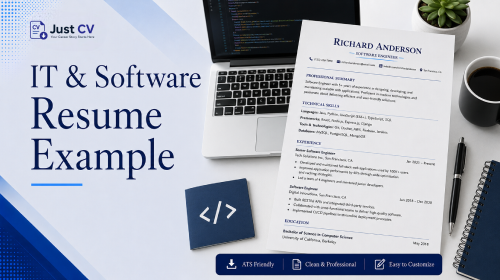

An IT or software resume is more likely to get shortlisted when it combines role-specific, results-driven experience with an ATS-friendly format. That means real numbers-uptime, deployment frequency, ticket volume written in plain bullet points, not locked inside a skills table or graphic that most parsers can’t open.
What Recruiters Look For in Tech Resumes
Recruiters skim before they read. In the first pass, they’re checking whether your experience matches the role not whether your resume looks clever.
Software matters here more than most candidates expect Research from Harvard Business School and Accenture found that 99% of Fortune 500 companies and nearly 75% of U.S. employers use applicant tracking systems (ATS) to manage hiring. For IT and software roles, that means your resume is usually screened by an ATS before it ever reaches a recruiter. Here’s what consistently catches a recruiter’s eye:
- Specific technologies, named clearly – “AWS,” “Kubernetes,” “SQL Server,” not vague phrases like “cloud experience.”
- Outcomes with numbers attached – uptime percentages, deployment frequency, tickets closed, incidents resolved.
- A role-appropriate title – a QA engineer’s resume should read differently from a backend developer’s or a DevOps engineer’s, even if some skills overlap.
- Show clear ownership- did you maintain a system, deliver a feature, or simply support the work?
- A clean, parseable format- standard section headers, no embedded tables or graphics carrying key content.
Most competitor “IT resume example” pages stop at the first two points. resume.io’s example content, for instance, uses generic bullet templates that don’t distinguish between a backend developer, a QA engineer, and a DevOps engineer- the same phrasing gets reused across very different tech roles. That’s a gap this guide is built to close: the worked example below is written for one specific, common mid-level IT profile, not a one-size-fits-all template.
Worked Example: Mid-Level Developer
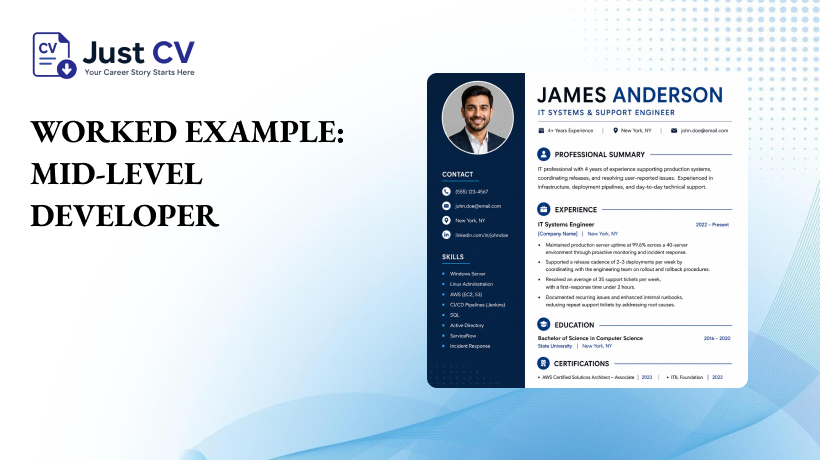
The example below shows how one mid-level IT professional spanning systems support and release work can turn day-to-day responsibilities into metrics-based bullet points. Treat the numbers as a pattern to follow, not a copy-paste target; swap in your own results.
Worked Example — IT Systems & Support Engineer (Mid-Level)
Professional Summary
IT professional with 4 years of experience supporting production systems, coordinating releases, and resolving user-reported issues. Experienced in infrastructure, deployment pipelines, and day-to-day technical support.
Experience
IT Systems Engineer — [Company Name], [City] | 2022-Present
- Maintained production server uptime at 99.6% across a 40-server environment through proactive monitoring and incident response.
- Supported a release cadence of 2-3 deployments per week by coordinating with the engineering team on rollout and rollback procedures.
- Resolved an average of 35 support tickets per week, with a first-response time under 2 hours.
- Documented recurring issues and enhanced internal runbooks, reducing repeat support tickets by addressing root causes
Skills
Windows Server, Linux administration, AWS (EC2, S3), CI/CD pipelines (Jenkins), SQL, Active Directory, ServiceNow, incident response
Notice what sets this apart from a generic template: every bullet connects a specific IT responsibility such as monitoring, deployment coordination, or ticket resolution—to a measurable result. Deployment frequency, in particular, isn’t a made-up metric, it’s one of the four “DORA” metrics Google Cloud’s DevOps Research and Assessment team identified as reliable indicators of software delivery performance.[2] Naming it on a resume signals you already think about your work the way engineering teams measure it. Apply the same structure to your own role, whether you work in backend development, QA, infrastructure, or another IT specialty.
If your own path into IT didn’t follow a straight line- a bootcamp, a lateral move from a different industry, or self-taught scripting that turned into a job that background still belongs on the resume. That counts, and it’s worth a line in your summary, not something to leave out.
Why Skill-Matrix Tables Can Hurt You With ATS

One of the biggest mistakes in tech resumes is the skill matrix table. Rows and columns rating your skills from “beginner” to “expert,” or grouping technologies into a neat grid. It looks organized on screen, and it’s genuinely risky for parsing.
Applicant tracking systems read resumes in a structured, linear order. A table breaks that order. Many parsers read left to right, row by row mixing your “Python” cell with the “Advanced” cell from an unrelated skill, or dropping the table’s content entirely. Resume-parsing guidance consistently recommends standard formatting instead, and warns against tables, columns, and unusual layouts for this exact reason.[3]
No competitor page in this cluster currently pairs an IT-specific worked example with this kind of ATS-formatting warning- most either show the table format uncritically or skip formatting guidance entirely. Here’s a side-by-side comparison of the two approaches:
| Skill-Matrix Table | Bullet-Point Skill List | |
|---|---|---|
| ATS parseability | Content may be misread or skipped | Content is parsed accurately in a predictable order |
| Recruiter scan time | Looks organized, but ratings (“Expert,” “Intermediate”) are subjective and easy to skip | Fast to scan; specific tools stand out immediately |
| Best use case | Rarely recommended for resumes submitted through an ATS | Safe default for any tech role, any ATS |
Checklist: Is your skills section ATS-safe?
☐ No table or grid layout for your skills section
☐ List your skills as plain text instead of using stars, bars, or percentage ratings.
☐ Skills listed as plain text, comma- or line-separated
☐ Section header reads “Skills” – not an icon or graphic
☐ Same information isn’t duplicated only inside a header, footer, or text box (Section 27 of JustCV’s own template requirements enforces this same rule)
If you’re not sure whether your current resume has this problem, JustCV’s ATS-tested templates are built to avoid it by default – every layout keeps skills in a plain, parseable list. Browse our ATS-friendly templates, or explore the ATS optimization guide to avoid formatting mistakes that can reduce your resume’s ATS compatibility.
Bringing It Together
A best IT resume doesn’t need a denser layout or a more creative design it needs specific technologies, real metrics, and a format an ATS can actually read cleanly. That combination is what separates a resume that gets opened from one that gets lost in a parsing error. For more role-specific breakdowns like this one, browse the full Resume Examples library.
Whether you’re a fresher building your first IT resume or an experienced engineer refreshing yours, the same two rules hold: be specific about what you did, and keep the format simple enough for a machine to read before a human ever sees it. If you’re earlier in that journey, JustCV’s resume for freshers guide and first job resume example walk through the same principles for an entry-level profile. If you’re further along, the resume for experienced professionals guide covers how to scale this approach across a longer work history.
Ready to put this into your own resume? Build My Resume– free, with an ATS-safe template already set up for you.
FAQs
Is a functional or chronological format better for an IT resume?
Most recruiters and ATS systems parse a reverse-chronological format most reliably. It’s also easier to scan for specific dates and titles. Save a functional or hybrid format only for unusual cases, like a major career change into IT.
Should I include a skills percentage or rating bar on my IT resume?
No. Percentage bars and star ratings are subjective and often unreadable to an ATS. List your skills as plain text instead, grouped by category if needed (e.g., “Cloud: AWS, Azure”).
How long should an IT resume be?
One page for under 8-10 years of experience; two pages if you have deep, relevant experience across multiple roles. Length matters less than whether every line adds specific, verifiable detail.
Do I need a different resume for backend, QA, and DevOps roles?
Yes, ideally. The core format can stay similar, but the bullet points, tools listed, and summary should reflect the actual role – a QA-focused resume should lead with testing and quality metrics, not deployment metrics.
What metrics should I include if I don’t have “hard” numbers like uptime?
Look for anything countable: tickets resolved, projects delivered, team size supported, systems maintained, or time saved through an improvement you made. Even an estimate, clearly framed as approximate, is more useful than a vague description.
Can I use tables to organize my technical skills?
It’s best to avoid tables for skills sections. Many applicant tracking systems read tables unpredictably, which can scramble or drop your listed skills. A plain bulleted or comma-separated list is safer.
Is JustCV’s resume builder free to use for IT resumes?
Yes, JustCV’s free plan includes a genuine, downloadable ATS-friendly PDF, not a locked or watermarked preview. You can build and export a full IT resume without entering payment details.