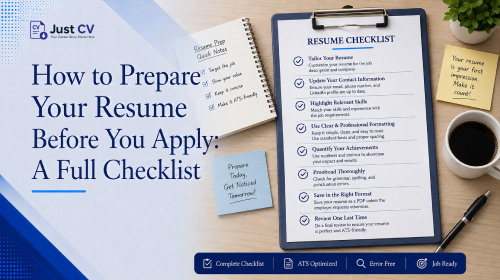
Preparing a resume means more than writing it once and hoping it fits. It means tailoring it to the specific job description, checking that the formatting will parse correctly, and proofreading before you submit. This checklist walks through each step – tailoring, formatting, and final review – so you apply with a resume that’s ready, not rushed.
Knowing how to prepare a resume is really about closing the loop between everything you’ve already built your template, your ATS formatting, your examples, your career story and the one job posting in front of you right now. Most guides stop at “write a good resume.” This one covers what happens in the hour before you hit submit.
Before You Apply: The Full Checklist
Use this for a final check before every application. Each item links to a deeper guide if you want to go further.
- Confirm your template still fits the role. Revisit ATS-Friendly Resume Templates: What Actually Passes the Filter if you’re applying to a different type of company than usual.
- Re-check ATS formatting. Run your resume through the ATS-Friendly Resume Tips for Freshers guide or JustCV’s ATS checker – one column, real text (not an image), no tables that split your Experience section.
- Match your bullet points to real achievements. If you’re unsure how to phrase yours, First Job Resume: A Full Example You Can Copy (The Right Way) shows a fully annotated real structure.
- Reframe any career break or transition clearly. See Career Break on Your Resume? Here’s How to Frame It Right if you’re returning after time away or moving between fields.
- Tailor your resume to this specific job description (next section).
- Proofread with fresh eyes (final section).
- Export as a real PDF, not a flattened image, so the ATS can read the text layer.
That’s the full pre-application sequence. The next two sections cover the two steps most guides skip entirely.
Tailoring Your Resume Per Job
This is the step resume.io’s own ranking page for “how to prepare resume” doesn’t really cover. Its page reads like a how-to, but it functions closer to a template gallery- useful for picking a layout, not for the actual work of matching your resume to a specific role.
Tailoring doesn’t mean rewriting your resume from scratch for every application. It means adjusting three things:
- Keywords from the job description. Match the language the employer used – “project management” versus “program management” can matter to both ATS parsing and a human reviewer.
- Order of your bullet points. Lead each section with the achievement most relevant to this specific role, not just your most recent one.
- Your professional summary. A short 2–3 line summary focused on what the employer wants shows you understood the job, not just the title.
If you’re tailoring your resume because you’re changing industries, moving from a technical role into people management, or returning after time focused elsewhere – that shift in framing is exactly what a hiring manager needs to see clearly stated, not hidden. That counts, and it belongs in your summary, not buried in a bullet point.
A note on AI assistance
|
Comparison: What a Template Guide Covers vs. What a Pre-Application Checklist Covers
| Step | Typical “resume templates” guide (e.g., resume.io) | This pre-application checklist |
|---|---|---|
| Choosing a layout | Covered in depth | Linked, not repeated |
| ATS formatting basics | Partial – often assumed | Full re-check step included |
| Tailoring to a specific job description | Rarely addressed | Dedicated section |
| Final proofreading pass | Not covered | Dedicated section |
| Ties earlier content together | Standalone page | Built as a hub for the full cluster |
Final Proofreading Pass
A polished resume can still lose a reader over a small, avoidable error. This isn’t about your experience – it’s about giving your experience a clean final read before it reaches someone else’s inbox.
Widely cited eye-tracking research from TheLadders found that recruiters spend around 7.4 seconds on their first scan of a resume – which is exactly why a clean, well-formatted layout carries as much weight as the words themselves in that first pass.
Run through this before you submit:
- Read it slowly out loud-your ears may catch mistakes your eyes miss.
- Check every date range lines up (months and years, consistently formatted).
- Make sure your contact details are up to date and placed in the main body, not the header, since some ATS systems may skip headers.
- Search for double spaces, inconsistent bullet punctuation, and font-size mismatches.
- Ask one other person to read it, if you can – a second set of eyes is genuinely valuable here.
- Save and export as a PDF with a real text layer, then open the PDF yourself to confirm it looks right.
It’s not about finding mistakes in what you did. It’s about giving a resume you’ve already built well the calm, careful final look it deserves before it goes out.
Bringing It Together
Preparing a resume, start to finish, isn’t one task – it’s five smaller ones: picking the right template, formatting for ATS, writing strong examples, framing your career story clearly, and tailoring plus proofreading for this one application. Each earlier guide in this series covers one piece. This checklist is where they meet.
If you’ve worked through the templates, ATS, examples, and career-growth guides already, tailoring and proofreading are usually the last twenty minutes before you apply – not a reason to delay.
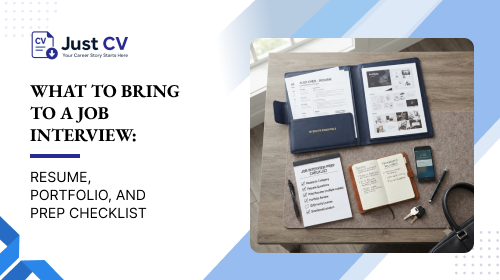
Ready to make sure your next interview goes just as smoothly? See What to Bring to a Job Interview: Resume, Portfolio, and Prep Checklist next.
Ready to put this into practice? Once your resume is ready, start free and download the PDF.
FAQs
How do I prepare my resume before applying to a job?
Confirm your template fits the role, re-check ATS formatting, tailor your bullet points and summary to the job description, then proofread carefully before exporting as a real PDF. Each step matters more than writing quickly.
How long should resume preparation take?
It varies by how much tailoring is needed, but a full pre-application pass – tailoring plus proofreading – typically takes 15–30 minutes once your base resume and template are already built.
Do I need a different resume for every job?
Not a completely different resume, but you should adjust keywords, bullet order, and your summary for each posting. Full rewrites aren’t usually necessary; targeted tailoring is.
What’s the most commonly skipped step in resume prep?
Tailoring to the specific job description. Many guides cover templates and formatting well but stop before addressing how to match a resume to one particular posting.
Should I proofread my resume even if I used an AI tool to help write it?
Yes. AI tools like JustCV’s assist with drafting and suggestions, but you stay the author. A final proofread by you (or a second reader) catches things automation can miss.
How do I make my resume ATS-friendly before submitting?
Use a single-column layout, real selectable text rather than an image, and keep contact details in the main body, not a header. JustCV’s ATS checker can review this for you before you apply.
What format should I export my resume in?
PDF is standard for most applications, since it preserves formatting while remaining ATS-readable – as long as it includes a real text layer, not a flattened image.
Is it normal to feel unsure if my resume is “ready”?
Yes, and that uncertainty doesn’t mean something’s wrong with your resume. This checklist exists so “ready” becomes a specific, checkable list rather than a feeling you have to guess at.
How long do recruiters actually look at a resume before deciding?
Widely cited eye-tracking research from TheLadders found recruiters spend an average of about 7.4 seconds on their first scan of a resume. That’s exactly why formatting and a clean final proofread matter as much as the content itself.
